
Top Mistakes Businesses Make in Website Design (And How to Avoid Them)
In today's digital-first world, your website is often the first interaction potential customers have with your business. Within just a few seconds, visitors decide whether they trust your company or leave for a competitor. Unfortunately, many businesses invest in a website but unknowingly make design mistakes that reduce credibility, hurt search engine rankings, and dramatically lower conversions.
According to Google's latest Helpful Content and Core Update guidelines, websites should be built primarily for users rather than search engines. A modern business website must provide a fast, secure, mobile-friendly, and user-focused experience while demonstrating expertise, experience, authority, and trustworthiness (E-E-A-T).
If your website receives traffic but very few enquiries or sales, chances are one or more design mistakes are preventing visitors from becoming customers.
In this guide, we'll explore the most common website design mistakes businesses make, why they affect SEO and conversions, and practical ways to fix them. Whether you own a startup, local business, eCommerce store, gaming platform, or enterprise company, avoiding these mistakes can significantly improve your online performance.
Why Does Website Design Matter More Than Ever in 2026?
Website design today goes far beyond colors and graphics. Modern websites directly influence:
- Google search rankings
- User engagement
- Lead generation
- Sales conversions
- Brand credibility
- Customer trust
- Mobile usability
- Business growth
Businesses that continuously improve their websites often experience higher conversion rates because they reduce friction during the customer journey.
Google also evaluates user experience signals such as page speed, mobile responsiveness, accessibility, helpful content, and navigation quality when determining search visibility.
If you're planning a new business website, you may also find our guide on Top 10 Features Every Business Website Must Have helpful before starting your project.
What Are the Biggest Website Design Mistakes Businesses Make?
Although every website is different, most poorly performing websites share similar problems.
Let's examine these mistakes in detail.
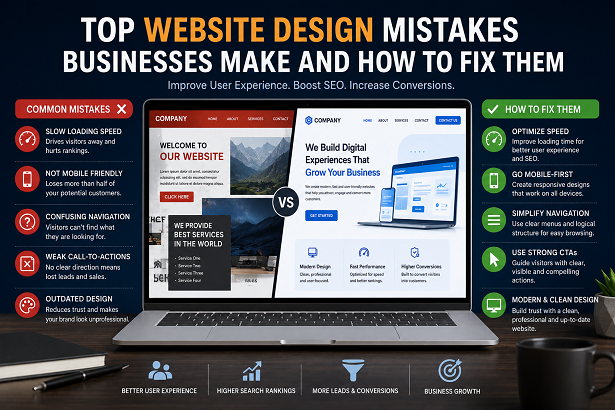
1. Slow Website Speed Is Driving Visitors Away
One of the biggest mistakes businesses make is ignoring website performance. Users expect pages to load almost instantly. Every additional second of loading time increases abandonment rates.
Common reasons websites become slow include:
- Oversized images
- Too many JavaScript files
- Poor quality hosting
- Unused plugins
- Heavy animations
- No browser caching
- Unoptimized CSS
Slow websites not only frustrate visitors but also reduce search engine visibility.
Businesses should regularly optimize:
- Images
- Fonts
- CSS
- JavaScript
- Server response time
- Core Web Vitals
2. Ignoring Mobile Users
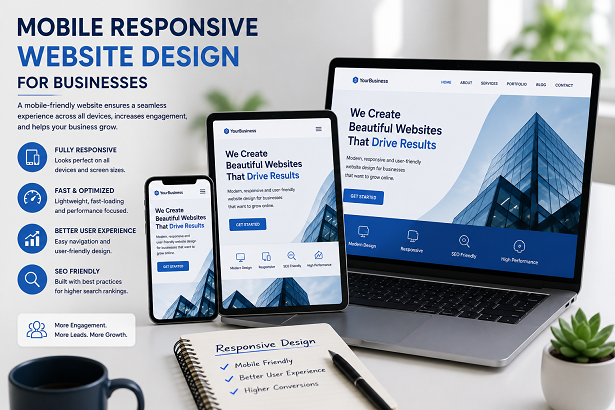
More than half of internet traffic now comes from smartphones. Yet many businesses still design websites primarily for desktop users.
A poor mobile experience usually results in:
- Small unreadable text
- Buttons that are difficult to tap
- Broken layouts
- Horizontal scrolling
- Slow mobile loading
- Poor navigation
Google now indexes websites using mobile-first indexing, meaning the mobile version largely determines search performance.
When building a new website, ensure every page works flawlessly across:
- Android devices
- iPhones
- Tablets
- Desktop screens
If you're comparing different development approaches, our guide on Static vs Dynamic Website – Which Is Better for Your Business explains how website architecture affects performance, maintenance, and scalability.
3. Is Your Website Navigation Confusing Visitors?
One of the most overlooked aspects of website design is navigation. Visitors should never have to guess where to click next. If users struggle to find information, they are likely to leave your website within seconds.
A well-designed navigation menu improves user experience, increases page views, and helps search engines understand your website structure. Google also rewards websites that make it easy for users to discover relevant information.
Common navigation mistakes include:
- Too many menu items
- Hidden navigation options
- Unclear page names
- Broken internal links
- No search functionality on large websites
- Poor mobile navigation
- Multiple dropdown levels that confuse visitors
Instead, organize your website logically with categories that reflect your business services. Every important page should be reachable within two or three clicks.
For example, businesses offering web design, SEO, mobile apps, branding, and digital marketing should group these services clearly instead of scattering them across multiple unrelated pages.
4. Are You Missing Strong Call-to-Action (CTA) Buttons?
A beautiful website without clear calls-to-action rarely generates leads. Many businesses expect visitors to contact them automatically, but users usually need guidance.
Every important page should encourage visitors to take the next step.
Effective CTA examples include:
- Request a Free Quote
- Contact Our Team
- Book a Consultation
- View Portfolio
- Download Brochure
- Get Started Today
- Schedule a Demo
CTA buttons should be:
- Easy to notice
- Placed above the fold
- Repeated naturally throughout long pages
- Designed using contrasting colors
- Written using action-oriented language
Businesses that optimize their CTAs often see significant improvements in enquiries and conversion rates without increasing advertising budgets.
You can also improve conversions by following our guide on Why Your Website Is Not Getting Leads (And How to Fix It).
5. Is Poor Content Layout Hurting User Experience?
Even valuable content becomes difficult to consume if the page layout is cluttered. Long walls of text discourage readers and reduce engagement.
Modern content should be easy to scan. Readers generally skim pages before deciding whether to continue reading.
Improve readability by using:
- Short paragraphs
- Clear headings
- Bullet points
- Tables
- Images
- Highlighted tips
- Proper spacing
Well-structured content also improves accessibility and increases the chances of appearing in Google's featured snippets.
Google's Helpful Content system favors content that is genuinely useful, easy to read, and written for people rather than search engines.
6. Are You Ignoring SEO During Website Design?
Many businesses spend thousands on an attractive website but forget that people first need to find it.
SEO should be integrated into the design process from the beginning—not added later.
Essential SEO elements include:
- Proper heading hierarchy
- Fast loading pages
- Descriptive page titles
- Optimized meta descriptions
- Image ALT attributes
- Internal linking
- Schema markup
- Clean URLs
- XML sitemap
- HTTPS security
Ignoring these basics often results in poor search visibility, regardless of how attractive the website looks.
If you're new to optimization, our guides on On-Page SEO Checklist for Beginners and Top 10 SEO Strategies That Actually Work in 2026 provide practical steps for improving your rankings.
7. Does Your Website Build Trust with Visitors?
Trust is one of the strongest factors influencing whether a visitor becomes a customer. A professional-looking website alone is no longer enough. Users want proof that your business is genuine, experienced, and reliable.
Google's E-E-A-T principles (Experience, Expertise, Authoritativeness, and Trustworthiness) emphasize that websites should demonstrate real expertise and transparency.
Ways to improve trust include:
- Displaying customer testimonials
- Showing verified business information
- Providing a clear About Us page
- Publishing original blog content regularly
- Displaying HTTPS security
- Adding company address and phone number
- Featuring client logos and portfolio work
- Using professional team photos where appropriate
Visitors are significantly more likely to contact businesses that appear transparent and credible.
8. Is Outdated Website Design Damaging Your Brand?
First impressions happen within seconds. An outdated website often gives visitors the impression that a business is inactive or behind current industry standards.
Common outdated design problems include:
- Old fonts and typography
- Poor color combinations
- Low-quality images
- Cluttered layouts
- Flashy animations
- Tiny buttons
- Non-responsive pages
- Broken links
Modern website design focuses on simplicity, readability, speed, accessibility, and user experience.
If your website is several years old, a redesign can dramatically improve user experience, search rankings, and lead generation.
Learn more by reading our article on Why Your Business Needs a Professional Website in 2026.
9. Are You Ignoring Website Accessibility?
Accessibility is no longer optional. A website should be usable by everyone, including people with disabilities.
Accessible websites generally provide a better experience for all users while also supporting SEO.
Accessibility improvements include:
- Proper heading hierarchy
- Image ALT text
- Keyboard-friendly navigation
- High color contrast
- Readable font sizes
- Clear button labels
- Descriptive links
- Logical page structure
Accessibility also demonstrates professionalism and helps businesses serve a broader audience.
10. Are You Measuring Website Performance?
Many businesses launch a website and never analyze how visitors actually use it.
Without data, it's impossible to know:
- Which pages generate leads
- Where visitors leave
- Which marketing campaigns work
- Which keywords drive traffic
- Which devices customers use
- How users navigate the website
Monitoring performance allows businesses to continually improve their websites instead of relying on assumptions.
Useful metrics include:
- Bounce Rate
- Average Engagement Time
- Pages Per Session
- Conversion Rate
- Organic Traffic
- Core Web Vitals
- Click-Through Rate (CTR)
Using tools like Google Analytics and Google Search Console helps identify opportunities for ongoing improvement.
Website Design Best Practices Checklist
Before launching or redesigning your website, use the following checklist to ensure it meets modern expectations.
Final Thoughts
A business website is much more than an online brochure. It is your digital salesperson, marketing platform, customer support center, and brand ambassador—all working around the clock.
Avoiding common website design mistakes can significantly improve user experience, search visibility, customer trust, and conversion rates. Businesses that regularly update their websites based on user behavior and Google's quality guidelines are far more likely to achieve sustainable online growth.
Rather than focusing only on appearance, prioritize usability, speed, accessibility, SEO, and valuable content. A website built around users will naturally perform better in search engines while generating more enquiries and long-term business opportunities.
Frequently Asked Questions
1. What is the biggest website design mistake businesses make?
The most common mistake is designing a website for appearance rather than user experience. A website should load quickly, be mobile-friendly, easy to navigate, and encourage visitors to take action.
2. Can poor website design affect Google rankings?
Yes. Slow loading pages, poor mobile usability, confusing navigation, weak content structure, and technical issues can negatively impact SEO and reduce organic traffic.
3. How often should a business redesign its website?
Most businesses should review their website every two to three years. Smaller improvements such as updating content, optimizing performance, and improving user experience should be done regularly.
4. Why is mobile responsiveness important?
Google uses mobile-first indexing, meaning it primarily evaluates the mobile version of your website. A responsive design improves usability, search rankings, and conversion rates.
5. How do strong call-to-action buttons improve conversions?
Clear CTAs guide visitors toward actions such as requesting a quote, booking a consultation, or contacting your business, resulting in more enquiries and sales.
6. Does website speed really matter?
Absolutely. Faster websites improve user experience, reduce bounce rates, support Core Web Vitals, and often lead to higher search rankings and better conversion rates.
7. Should every business invest in SEO-friendly website design?
Yes. SEO-friendly websites help search engines understand your content, increase visibility, attract targeted visitors, and generate more qualified business leads over time.
If you want expert help, check our digital marketing services.
Related Articles
- Why Your Business Needs a Professional Website in 2026
- Top 10 Features Every Business Website Must Have
- Static vs Dynamic Website – Which Is Better for Your Business?
- Why Your Website Is Not Getting Leads (And How to Fix It)
Sources & References
Conclusion
Great website design is not just about aesthetics—it is about creating a seamless experience that helps visitors find information, trust your brand, and take meaningful action. Businesses that avoid common design mistakes and continuously improve their websites enjoy stronger search visibility, better user engagement, and higher conversion rates.
Whether you are launching a new website or redesigning an existing one, focus on speed, responsiveness, accessibility, SEO, helpful content, and clear conversion paths. These principles align with Google's latest Core Updates and E-E-A-T guidelines, helping your website remain competitive for years to come.